
Download Summarize.ing – AI‑Powered YouTube Video Summaries, Free & Secure Tool
Overview
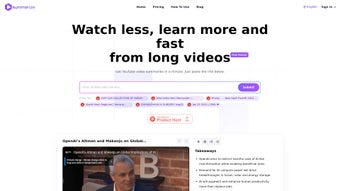
Summarize.ing is an AI‑driven web application that transforms YouTube videos into concise, multi‑dimensional summaries in under a minute. By simply copying a video URL into the input field, users receive a detailed text summary, highlighted key points, mind‑map visualisations, and segmented chapter‑by‑chapter digests. The engine behind the service is Claude 2, a state‑of‑the‑art language model that not only extracts the core narrative but also generates relevant questions and answers, making the learning experience interactive and deeper.
While the base version is completely free, a premium tier unlocks advanced analytics such as sentiment heat‑maps, deeper keyword extraction, and export options for research or classroom use. The platform currently supports English‑language videos and is limited to YouTube content, but within that scope it delivers speed, accuracy, and a polished user interface that feels both modern and intuitive. Whether you are a student trying to capture lecture highlights, a marketer researching competitor content, or a casual viewer who wants to decide if a video is worth watching, Summarize.ing offers a practical solution that reduces the time spent scrolling and note‑taking.
Its secure, browser‑based design ensures that no software installation is required, and all processing happens in the cloud, protecting your device from unnecessary load while keeping your data private. In short, Summarize.ing is a fast, reliable, and AI‑enhanced summarisation tool that brings the power of modern language models to everyday video consumption.
Key Features & How It Works
- Instant video URL paste – no login or download required.
- Full‑text summary generated in under 60 seconds.
- Highlight extraction – bolded sentences that capture main ideas.
- Mind‑map visualisation for visual learners.
- Segmented chapter summaries for easy navigation.
- AI‑generated Q&A based on video content.
- Free tier with unlimited summaries; premium tier adds deeper analytics.
- Secure, GDPR‑compliant cloud processing.
- Responsive design works on desktop, tablet, and mobile browsers.
How the AI Engine Powers Summaries
At the heart of Summarize.ing lies Claude 2, an advanced conversational model trained on massive text corpora. When a YouTube URL is submitted, the platform extracts the transcript (or auto‑generated captions when a transcript is unavailable) and feeds it into Claude 2. The model then performs three parallel tasks: (1) distilling the narrative into a concise paragraph, (2) identifying and bold‑highlighting the most informative sentences, and (3) constructing a mind‑map that links concepts visually. In the premium version, Claude 2 also performs sentiment analysis and keyword density scoring, providing a richer analytical layer. The Q&A generator parses the transcript, formulates plausible learner questions, and answers them with the same level of contextual understanding, effectively turning any video into an interactive study guide.
Why These Features Matter
Traditional video consumption forces viewers to watch the entire content to locate key points. Summarize.ing flips that paradigm by delivering the essence first, allowing users to decide whether a deeper dive is needed. The mind‑map offers a quick visual recap, ideal for visual learners, while segmented summaries break long videos into bite‑size sections, perfect for busy professionals. The built‑in Q&A turns passive watching into active learning, reinforcing retention. Moreover, the free tier’s unlimited usage makes it accessible to students and hobbyists, while the premium tier’s advanced analytics cater to researchers, marketers, and educators who need deeper insights without manual transcription or third‑party tools.
Installation, Usage & Compatibility
One of the biggest advantages of Summarize.ing is that it is a pure web application—there is no software to download, install, or update on your device. To get started, open any modern browser (Chrome, Edge, Firefox, Safari) on a Windows, macOS, Linux, Android, or iOS platform, navigate to summarize.ing, and you are ready to go. The site automatically detects your device’s screen size and adjusts the layout for optimal readability, ensuring a seamless experience on both desktops and mobile phones.
Step‑by‑Step Guide
- Copy the YouTube video URL you wish to summarise.
- Paste the URL into the input box on the homepage.
- Click the “Summarize Now” button.
- Wait for 30‑60 seconds while the AI processes the transcript.
- Review the generated summary, highlights, mind‑map, and segmented sections.
- (Optional) Click “Generate Q&A” to receive a set of question‑answer pairs.
- If you have a premium account, explore deeper analytics like sentiment heat‑maps or export the results as PDF/Markdown.
Supported Operating Systems: Summarize.ing runs on any OS that supports a recent web browser, including Windows 10/11, macOS 12+, Linux distributions with Chromium‑based browsers, Android 8+ and iOS 13+. Because all processing occurs server‑side, the tool places minimal demand on local hardware, making it ideal for low‑spec laptops, tablets, or even public computer labs.
Security & Privacy
All data transmitted between your browser and Summarize.ing’s servers is encrypted with TLS 1.3. The service does not store video URLs or transcripts beyond the active session unless you explicitly save a summary in your premium account. This approach respects user privacy while still delivering rapid, cloud‑based AI analysis. Additionally, the platform complies with GDPR and CCPA regulations, giving European and Californian users confidence in data handling practices.
Pros & Cons
Pros
- Lightning‑fast summaries – usually under a minute.
- No installation required; works directly in the browser.
- AI‑generated Q&A turns passive watching into active learning.
- Mind‑map visualisation aids visual comprehension.
- Free tier offers unlimited usage for basic summarisation.
- Premium analytics provide deeper insights for professionals.
- Secure, GDPR‑compliant, and respects user privacy.
- Responsive design works on Windows, macOS, Linux, Android, and iOS.
Cons
- Only supports YouTube videos; other platforms are not yet integrated.
- English‑only transcript processing limits non‑English content.
- Premium features require a subscription, which may be pricey for casual users.
- Quality of summaries depends on the accuracy of YouTube’s auto‑captions when official transcripts are missing.
- No offline mode – an internet connection is mandatory.
Summarize.ing delivers a compelling blend of speed, AI intelligence, and user‑friendly design that makes it a standout tool for anyone looking to extract value from YouTube videos quickly. While the platform’s limitation to English YouTube content may restrict some users, the depth of the free tier and the thoughtful premium upgrades justify its place in the modern digital‑learning toolbox.
FAQ & Conclusion
Is Summarize.ing really free to use?
Yes, the core summarisation feature is completely free with no hidden fees. Users can generate unlimited text summaries, highlights, and basic mind‑maps without a subscription. Premium features such as sentiment analysis, export options, and advanced analytics require a paid plan.
Do I need to install any software or browser extension?
No installation is required. Summarize.ing is a cloud‑based web app that runs in any modern browser. Simply visit the website, paste a YouTube URL, and start summarising.
Can I summarise videos that are not in English?
Currently the service only processes English transcripts. If a video has an English auto‑caption, Summarize.ing can still generate a summary, but native non‑English content is not supported at this time.
What browsers are compatible with Summarize.ing?
Summarize.ing works on all major browsers, including Google Chrome, Microsoft Edge, Mozilla Firefox, and Apple Safari, on desktop and mobile operating systems.
How does the AI generate the Q&A section?
The underlying Claude 2 model analyses the transcript, identifies key concepts, and formulates plausible learner questions. It then answers those questions using the same contextual understanding, creating a mini‑quiz that reinforces the video’s main ideas.
Conclusion – Why You Should Try Summarize.ing Today
In a world where video content dominates learning, research, and entertainment, the ability to distil hours of footage into bite‑size, actionable insights is a game‑changer. Summarize.ing delivers exactly that: a fast, secure, and AI‑enhanced summarisation engine that works directly in your browser. Whether you are a student needing quick lecture recaps, a marketer analysing competitor videos, or simply a curious viewer wanting to decide if a video is worth your time, Summarize.ing saves you minutes – or even hours – of scrolling and note‑taking.
The free tier provides unlimited core functionality, while the premium plan unlocks deeper analytical tools for power users. With its modern UI, cross‑platform compatibility, and privacy‑first approach, the tool feels both trustworthy and future‑ready. Give Summarize.ing a try today, paste a YouTube link, and experience how AI can turn any video into a concise, knowledge‑rich summary in seconds.
Start your free summarisation now and boost your learning efficiency instantly!



.png)



